Showing posts with label LAPTOPS. Show all posts

Wednesday, 9 August 2017

See the new Intel 18-corei9 spec, release date &  price

See the new Intel 18-corei9 spec, release date & price


Intel announce  it new core i9 x-series family  at complex 2017, it comes with more cores than the old core i7 HEDT CPU.
The CPU is available in four cores from 12 to 18-cores being the highest of them all, and aim at targeting the desktop market with more power and speed. 

Core i9 speed and performance 

The core i9 in no doubt is about to steal the attention from the much awaited AMD Threadripper, when it comes to performance the CPU plays an important role, it is determine by how much power and speed it can deliver.

Release date.

The four cores chip are ready to hit the market soon, haven reveal the clock speeds and TDP power estimates, the 12-core Core i9-7920X will launched in August 28, while the 14-, 16-, and 18-core Core i9 chips will be available by September 25. 
Though the 18-core Core i9 chip is coming a little early than it previous date,  it was expected to ship in October. 

Intel has announce that all the clock speed in the core i9 x-series family are unlock and waiting to be overclock. 
Below are the summary of the core counts and clock speed of the core i9 x-series family.

 Core i9 
Core i9-7960X: 2.8GHz, 4.4GHz burst 
(16 cores-32 threads) 
Core i9-7940X: 3.1GHz, 4.4GHz burst
(14 cores-28 threads) 
Core i9-7920X: 3.1GHz, 4.4GHz burst
(12 cores-24 threads) 
Core i9-7900X: 3.3GHz, 4.5GHz burst
(10 cores-20 threads) 

Core i9 extreme edition 
Core i9-7980XE: 2.6GHz, 4.4GHz burst 
(18 cores-36 threads) 

Cost of core i9 x-series chip 

The chipset comes with a starting price of $999 to $1,999 in the order of performance. 
The tCore i9-7980X, extreme edition is said to be the most expensive chip  with a high price tag of $1,999.

Also read 
The core i9 chip is made to carry out intensive multitasking job like virtual reality, gaming etc, with the price tag place on it, it goes to shows the chip is not made for everyone, unless you really need to perform some task listed above. 

Conclusion 

The new Intel core i9 with 18-cores and 36 threads is faster than 10-cores chip found in the corei7 x-series, and can compete with the new AMD Threadripper,if speed and performance is a priority, don't hesitate to get it. 

Tuesday, 8 August 2017

Perform clean boot in Windows 7/8.0 /10

Perform clean boot in Windows 7/8.0 /10

Perform-clean-boot-windows-7-8-10

Most of us are familiar with safe mode in Windows where you restart your computer and start pressing the F8 key on your keyboard, the clean boot state is different from it. 

When you start your computer, several applications and programm run at the background which includes antivirus application, system  utility applications and basic system processes. 
These applications and services tend to cause software conflict when trying to install some applications on your windows computer. 

Also read 

When you experience such errors, the clean boot state is performe to troubleshoot the windows problem, it uses a minimum set of startup program and service to help eliminate software conflict issues that occur while trying to install a program. 
This post will show you how to perform a clean boot on Windows 7,8.0,8.1/10 to resolve conflicting application errors on your  computer. 

How to perform clean boot 

1.Press win+R key on your keyboard to open run, now  type msconfig and click enter to open System Configuration
Clean-boot-state-windows

2. On General tab, select start up and untick load start up system. 

3. Now, click on service tab in system configuration and select hide all  Microsoft services, after that click on disable all box. 
Clean-boot-state-windows

4. Click on OK /apply and restart your computer,you've successful put your windows into clean boot state. 

How to troubleshoot software conflict 

Once the computer have restart into a clean boot environment, you can go ahead and install or uninstall the program again. 

How to restart computer back to normal startup

When you're done with the installation process , you can now restart your computer in normal mode. 
Simply press Win+R key to open run, type msconfig and click enter to open System Configuration

In general tab, select normal startup,then move to service tab and uncheck hide all Microsoft service, click on the enable box. 

Click on OK/Apply and restart computer back to normal mode. 
If you're still unable to unistall or install a program , you can contact me via email udeme.peter5@gmail.com for your software issues. 
Dell Inspiron 15R (N5110) Beep codes indicator &  common fix

Dell Inspiron 15R (N5110) Beep codes indicator & common fix

Dell-Inspiron-15R-N5110-beep-codes

When you power on a laptop, it goes through a set of diagnostic test to make sure all components are working correctly, the process which it goes through to perform this action is called POST or power on self test. 

Whenever any of the test fails while powering on the laptop is program to notify the user with POST codes which includes beep codes , light codes. 
For  diagnosis of beep codes, you need to restart the laptop if it is already on or listen to the numbers of beep codes to identify where the problem is coming from. 

How to identify Dell Inspiron 15R beep codes 

In other to rectify the issue with beep codes, you need to understand what each beep codes means, below are the list of Dell Inspiron 15R (N5110) Beep Codes. 

Possible number of beep
Description
Possible causes
1
BIOS ROM checksum in progress or failure
System board failure, covers BIOS corruption or ROM errors.
2
No Memory (RAM) detected
Memory or Memory slot failure
3
chipset Error (North and South bridge error, DMA/IMR/Timer error)
Time-Of-Day Clock test failure
Gate A20 failure
Super I/O chip failure
Keyboard controller test failure
System board failure
4
Memory read / write failure
Memory failure
5
Real Time Clock (RTC) power fail
CMOS battery failure
6
Video BIOS test failure
Video subsystem failure
7
CPU Cache test failure
Processor failure
8
LCD

Also read 

It's one thing to identify where the fault comes from and it's another thing to solve the problem, in case they might be too complicated for you, I'll suggest you take your Inspiron 15R (N5110) to a computer engineer for possible fix but if you can handle it then this are the common fix of Inspiron 15R (N5110) beep codes. 

Common fix of Dell Inspiron 15R beep codes 

1 Beep: Replace the motherboard

2 Beeps: clean and reseat the memory or replace the memory.

3 Beeps: Replace the motherboard 

4 Beeps: clean and reseat the memory or replace the memory.

5 Beeps: Replace with new CMOS battery.

6 Beeps: Replace the video card or replace the motherboard 

7 Beeps: Reseat or replace the CPU.

8 Beeps: Reseat the LCD cable or replace the LCD screen.

In the case of replacing with new motherboard, you can contact a laptop engineer to see if there is anything that can be done to fix it, if you're in Lagos, Nigeria you can contact me to check and fix your Dell Inspiron  15R (N5110) laptop for you at affordable price.Reach me via email, udeme.peter5@gmail.com. 

Monday, 7 August 2017

HP ZBook Studio G3 specifications &  price

HP ZBook Studio G3 specifications & price

HP-ZBook-Studio-G3-price

HP ZBook Studio G3 is a powerful workstation laptop build with cool design, the 6th gen Intel corei7 laptop offers a ultra slim design with  Intel Xeon processor and 32 GB of RAM for blazing-fast performance. 


HP ZBook Studio G3 key specifications
 

  • 15.6-inch LED display 
  • 4GB, 8GB, 16GB and 32GB RAM option 
  • 6th Gen Intel corei7, Xeon E3 processor 
  • Intel HD Graphic 530,Intel Iris Pro Graphics, NVIDIA Quadro 
  • Windows 7 professional, Windows 10 Pro, FreeDos 2.0
  • 512GB SSD, up to 1TB HP ZBook Turbo Drive G2

Design and display 

The HP ZBook Studio G3 is a high-end laptop made with aluminum-and-magnesium chassis, it was design to pass the 15 MIL-SPEC-810G tests military durability standard. 

Despite it being a workstation, we have to commend HP for making a slim design out of it, with thickness measured at 0.71 inches and weighs 4.6 pounds making it lighter and slim. 

Also read 

In terms of display, the HP ZBook Studio G3 features a 15.6-inch 3840 x 2160 pixel display 4K UHD DreamColor. 

Performance 

In term of performance, the HP ZBook Studio G3 house a powerful 6th Gen Intel corei7, Xeon E3 processor with up to 32GB RAM. 
The workstation also offer NVIDIA Quadro for graphics with 512GB SSD and support up to 1TB HP ZBook Turbo Drive G2. 
It is considered to be one of the fastest laptop available for users. 

Other spec and features 

HP ZBook Studio G3 has a Bang & Olufsen-tuned speakers to give users quality audio sound, on the left side, it has a Ethernet port, lock slot and two  USB 3.0 port while on the right side there is a two Thunderbolt ports, HDMI port, headphone jack and USB 3.0. 
 
The ZBook Studio G3 has a 0.9-megapixel camera for selfie and Web cam video. 
There is also a fingerprint scanner at the lower-right hand corner of the laptop. 

Price &  availability 

HP ZBook Studio G3 is  available Nigeria, Ghana and Kenya, you can order for it online on Jumia or konga,  price of the workstation starts from $1,999 to $2,999 base on the configuration you want to purchase. 

ZBook Studio G3 price in Nigeria start from 730,000 depending on the configuration and location you're buying from. 

HP ZBook Studio G3 Full specifications

CPU:2.8GHz Intel Xeon E3-1505M v5

Operating system:  Windows 10 Pro

Display: Size 15.6
Native Resolution 3840 x 2160
Size 14.76 x 10.04 x 0.71 in
Weight 4.6 pounds

RAM:32GB
Upgradable to 32GB

Hard Drive Size 512GB SSD
Hard Drive Type PCIe SSD

Graphics Card NVIDIA Quadro M1000M Graphics
Video Memory 4GB

Wi-Fi 802.11ac
Wi-Fi Model Intel 8260 ac (2x2)
Bluetooth Bluetooth 4.1
Mobile Broadband
Touchpad Size 4.3 x 2.9

Ports (excluding USB) Ethernet
HDMI
 Headphone
 Thunderbolt
  USB 3.0
USB Ports 2
Card Slots SD memory reader

Battery:4 cell, 64 WH Li-ion battery 


Friday, 4 August 2017

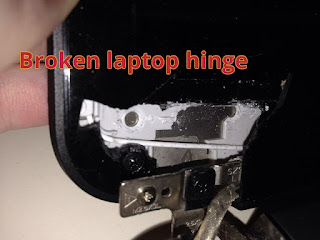
See how  to prevent laptop broken hinges

See how to prevent laptop broken hinges

Laptop-broken-hinges-repair


There are many laptops brand and models  you can choose from, they come in different size, shape, specifications and design. 
Just like every other electronics, the laptop can develop fault, this might be due to rough  usage, faulty parts or power problem. 

Most of the latest laptop are fragile, apart from the faults listed above, they tend to break easily,  and one of the area it tend to develop this fault is the hinges. 
The likes of hp 15, hp 250,lenovo G50-45, lenovo G50-80 etc are build with fragile carcass. 

This post is going to show you, how you can handle your laptop carefully to prevent the hinges or carcass from breaking off. 
 

All you need to know about laptop broken hinges 


The hinges allows you to close and open the laptop at will, it  hold the screen with screw to prevent it from falling, and is screwed to the bottom and top carcass of your laptop to make you close and open it easily. 

Also read

From factory,  the hing joint is tighten to make the top carcass stay properly at any level you bend it. 
However, this tend to  make the laptop carcass break off since it is not strong enough to handle the force that comes with it when you open and close at random. 

It is advisable you losen the hing joint with a plyer to free the joint a bit, this will help reduce the force that comes with it when you open and close your laptop. 
Take it to a good engineer to help you do the job properly, this will save you the stress of buying a new carcass or hinges. 
 
Apart from this, lastest laptop models comes in slim size , the carcass  are fragile and can easily break off if not handled carefully. Always place the laptop on a flat surface to prevent it from falling and do not place heavy objects on it. 

Haven done what's written above, your laptop hinges and carcass will last longer, it won't pull off the carcass like that of hp 15 or other slim latest laptop with fragile carcass. 

Problem that occurs when the hinges of a laptop is broken. 

When the hinges of the laptop break or pull off from the down carcass, it will develop other issues on the laptop if not repaired as soon as possible, below are the fault that may arise it the issue occurs:

1. The screen will not stand correctly 

2. The screen will break if not handled carefully 

3. The flex (signal cable)  will get spoilt 

Where to repair  laptop broken hinges 

If your laptop hinge is broken and you're looking for where to repair it, you can take it to any good laptop engineer closer to you, and If you're in Lagos, you can contact me to help you fix your laptop hinges at affordable price

This is how you prevent your laptop hinges from getting broken, and breaking the laptop carcass. Kindly share the post by using the share buttons.