Showing posts with label How-to. Show all posts

Monday, 7 August 2017

How to borrow airtime on 9mobile network

How to borrow airtime on 9mobile network

How-to-borrow-airtime-on-9mobile

If you run out of airtime and want to make an important call or send a text, with 9mobile easy credit service you can now borrow airtime for calls, text or data from 9mobileNg. 

How to check your eligibility status for 9mobile easy credit. 

First, you need to confirm if you're eligible to borrow airtime on 9mobile.
To do this, simply dial *665*3# or send text STATUS to 665

USSD code to borrow airtime on 9mobile easy credit. 
After checking your eligibility status, you can now go on and borrow credit without delay. 

Dial *665*amount#
E.g *665*200# to borrow N200

Or 

Text Amount to 665
E.g 200 to 665 to borrow N200

Also read 

Note that 15% of any amount you borrow will be deducted as service charge, which means if you borrow N200, you will receive N170 and if you borrow N100, you will receive N85. 

Below are the list of amount you can borrow on 9mobile easy credit. 
  •  50
  •  100
  •  200
  •  500
  •  1,000
You have no cause to worry about, when you run out of airtime on your 9mobile line, simply dial the USSD code to borrow airtime and pay later. 
How to check UBA account balance on mobile phone

How to check UBA account balance on mobile phone

UBA-account-balance-mobile-phone

Banks are coming up with innovative ways to satisfy and bring in more customers to their base, UBA has made it easy for customers on their banking platform to check their account balance without the use of Internet. 

This means, if you don't have the UBA mobile banking app install on your phone or you don't use a smartphone, you can easily check your account balance by dialing a USSD code on any phone you use with the number registered with the bank. 

How to check UBA account balance 

As long as you use a mobile device, and can also check your airtime a balance then you can also check your UBA account balance with the USSD code issued by the bank. 

Also read 

To check your account balance, you have to make sure you're using the phone number that have been linked to the bank during your registration, simply dial *919*00# and your balance will be sent to you. 

Sunday, 6 August 2017

How to get MTN double data 2017

How to get MTN double data 2017

Mtn-double-data-bonus


This post will show you how to get double data bonus  on any data plan on your MTN line, this is not a tweak, you don't need to change imie or use any VPN application to get the MTN data bonus. 

All you need to do is follow the steps below to start enjoying the bonus. 

How to activate mtn data bonus 

Step 1. First, you need  to send MTN data bonus code to start enjoying the offer, simply text "double to 131"  to activate the bonus. 

Step 2. After that, send "promo to 131"

Step 3. Next, send "free to 131"

You will receive a lot of message from the text you sent, just ignore till your get a message with "DEAR CUSTOMER,ENJOY FREE DATA ON YOUR MTN ZONE, DAIL *131*1#" 

Also read 

We are almost there, if you get the above message, then you've successful activated the MTN data bonus on your MTN line, now purchase any data plan by  dialing *131*1# to choose from any of the listed data bundle, you will receive double data from the plan you subscribe to. 
Mtn-double-data

Check mtn data bonus 

To check your available double  data bonus, simply send "2 to 131"

Kindly share your experiences in the comment box below and don't forget to hit the share button. 

Friday, 4 August 2017

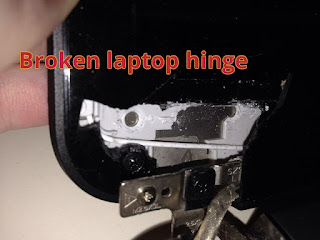
See how  to prevent laptop broken hinges

See how to prevent laptop broken hinges

Laptop-broken-hinges-repair


There are many laptops brand and models  you can choose from, they come in different size, shape, specifications and design. 
Just like every other electronics, the laptop can develop fault, this might be due to rough  usage, faulty parts or power problem. 

Most of the latest laptop are fragile, apart from the faults listed above, they tend to break easily,  and one of the area it tend to develop this fault is the hinges. 
The likes of hp 15, hp 250,lenovo G50-45, lenovo G50-80 etc are build with fragile carcass. 

This post is going to show you, how you can handle your laptop carefully to prevent the hinges or carcass from breaking off. 
 

All you need to know about laptop broken hinges 


The hinges allows you to close and open the laptop at will, it  hold the screen with screw to prevent it from falling, and is screwed to the bottom and top carcass of your laptop to make you close and open it easily. 

Also read

From factory,  the hing joint is tighten to make the top carcass stay properly at any level you bend it. 
However, this tend to  make the laptop carcass break off since it is not strong enough to handle the force that comes with it when you open and close at random. 

It is advisable you losen the hing joint with a plyer to free the joint a bit, this will help reduce the force that comes with it when you open and close your laptop. 
Take it to a good engineer to help you do the job properly, this will save you the stress of buying a new carcass or hinges. 
 
Apart from this, lastest laptop models comes in slim size , the carcass  are fragile and can easily break off if not handled carefully. Always place the laptop on a flat surface to prevent it from falling and do not place heavy objects on it. 

Haven done what's written above, your laptop hinges and carcass will last longer, it won't pull off the carcass like that of hp 15 or other slim latest laptop with fragile carcass. 

Problem that occurs when the hinges of a laptop is broken. 

When the hinges of the laptop break or pull off from the down carcass, it will develop other issues on the laptop if not repaired as soon as possible, below are the fault that may arise it the issue occurs:

1. The screen will not stand correctly 

2. The screen will break if not handled carefully 

3. The flex (signal cable)  will get spoilt 

Where to repair  laptop broken hinges 

If your laptop hinge is broken and you're looking for where to repair it, you can take it to any good laptop engineer closer to you, and If you're in Lagos, you can contact me to help you fix your laptop hinges at affordable price

This is how you prevent your laptop hinges from getting broken, and breaking the laptop carcass. Kindly share the post by using the share buttons. 

Monday, 31 July 2017

How to open recently close tabs on opera mini Android phone

How to open recently close tabs on opera mini Android phone


Open-close-tabs-in-opera-mini-andriod
Opera Mini is one of the widely use Android browser on mobile, it has gain more than 100million user with India leading the chat. 

The lightweight browser comes with a lot of features that includes Block Ads, video downloads, add to home screen, browse privately tab, and multi-task that allows user to open a lot of tab. 

I wrote a post on how to open recently or accidentally close tabs on Google Chrome on Windows, today I'm going to show you how you can open recently close tabs with Opera Mini on Android phone. 

With Opera Mini, you can open more than 100 tabs on your phone, while trying to switch tabs you might mistakenly close an important one. 

Sometimes,after closing a tab, the need to get the information back may arise especially when you didn't save the page you open. 
You have nothing to worry about whenever such scenario occurs, this post will show you how to recover recently close tabs Opera Mini on Android. 

Open close tabs on opera mini 

Step 1. Click on the button showing the recent number of tabs currently running. 
Recently-close-tab-opera-mini


Step 2. Click on the 3 dots radio button at the bottom right hand corner of your browser. 
Recently-close-tab-opera-mini-andriod

Step 3. "Select reopen closed tab"

Immediately you do that, any tab you close will come up again, you can now click on it and allow it  load the information in it. 
Kindly share your experience, and don't forget to hit the share button.